mirror of
https://github.com/jellyfin/jellyfin-web.git
synced 2026-10-26 16:45:18 +00:00
 Konstantin OstrovskiiandKonstantin Ostrovskii
17aae059c3
Konstantin OstrovskiiandKonstantin Ostrovskii
17aae059c3
* Fix isRelativeDay returning wrong result across month boundaries

isRelativeDay compared the target date's day-of-month against the raw
`getDate() + offsetInDays` value instead of the day after setDate()
normalizes it. On the 1st of a month that raw value is 0 (or negative),
so a date that really is "yesterday" (the last day of the previous month)
was never matched. This made the "Yesterday" grouping in the Upcoming
Episodes view fall back to a full date on the 1st of every month.

Compare against yesterday.getDate() after the setDate() adjustment so the
month/year rollover is respected. Add unit tests covering the same-month,
month-boundary and year-boundary cases for -1/0/+1 offsets.

* Replace isRelativeDay with date-fns isYesterday

Both call sites only ever asked for an offset of -1, so drop the custom
helper and use date-fns instead, per review feedback.

---------

Co-authored-by: Konstantin Ostrovskii <4070730+Grinv@users.noreply.github.com>
Jellyfin Web
Part of the Jellyfin Project








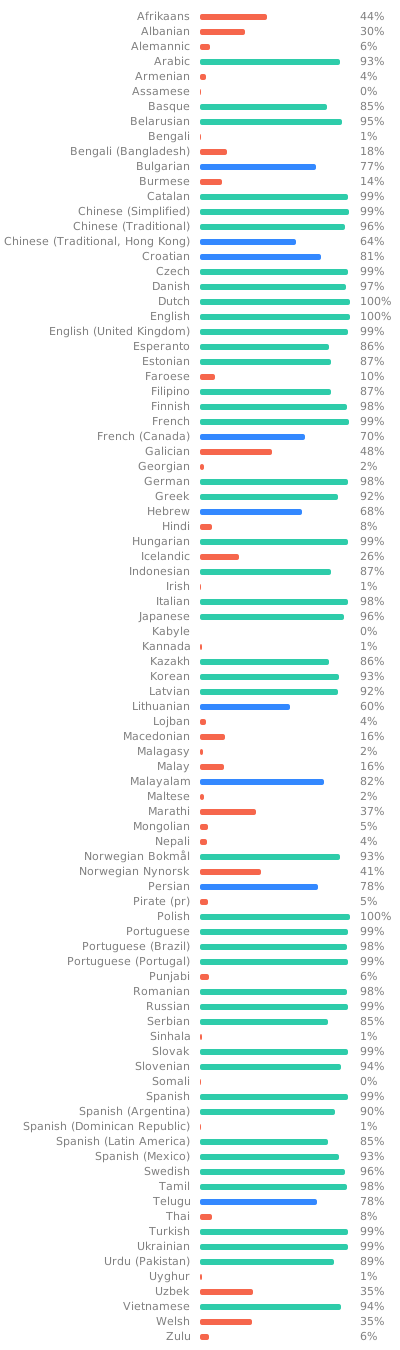
Jellyfin Web is the frontend used for most of the clients available for end users, such as desktop browsers, Android, and iOS. We welcome all contributions and pull requests! If you have a larger feature in mind please open an issue so we can discuss the implementation before you start. Translations can be improved very easily from our Weblate instance. Look through the following graphic to see if your native language could use some work!
Build Process
Dependencies
- Node.js
- npm (included in Node.js)
Getting Started
-
Clone or download this repository.
git clone https://github.com/jellyfin/jellyfin-web.git cd jellyfin-web -
Install build dependencies in the project directory.
npm install -
Run the web client with webpack for local development.
npm start -
Build the client with sourcemaps available.
npm run build:development
Review the Contributing Guide for more information on our process and tech stack.